StartCleaner (1.1.2) has been updated.
更新
- 版本 1.1.2 (2026/09/22)
- 新增安全检查,防止误删启动项
- 修复在某些设备上加载更新信息时出错的问题
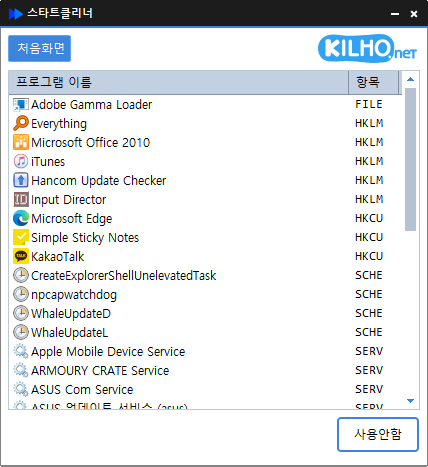
- Easily manage programs that run automatically at startup.
- Manage various items in one place, including the Startup folder, registry, Task Scheduler, and services.
- Safely change settings by disabling items instead of deleting them.
Homepage
- StartCleaner : https://startcleaner.kilho.net
历史记录
-
版本 1.1.2 (2026/09/22)
- 新增安全检查,防止误删启动项
- 修复在某些设备上加载更新信息时出错的问题
-
版本 1.1.1 (2026/07/20)
- 新增一步彻底移除启动程序及其残留
- 增强确认和安全保护,帮助避免误删
- 修复部分用户的已移除程序可能重新出现在列表中的问题
-
版本 1.1.0 (2026/04/30)
- 显著提升启动程序列表的加载速度
- 优化重复处理,提升响应速度
- 减少加载任务计划程序条目时的延迟
- 清理未使用的内部代码,提升稳定性
-
版本 1.0.9 (2026/03/27)
- 修复启动项可能显示错误的问题
- 改善更改启动设置时的稳定性
- 提升加载启动列表时的可靠性
- 通过清理内部代码改善整体稳定性
-
版本 1.0.8 (2026/02/26)
- 改善更新数据处理的稳定性
Related Links
- Update notice : https://kilho.top/archives/notice/2940
License
- StartCleaner is freeware.
- You can use it freely in any setting, including at work, at home, in government offices, and at school.
- You are free to distribute it anywhere.
下载文件
Frequently Asked Questions (FAQ)
- Is StartCleaner free?
Yes, you can use StartCleaner for free at work, at home, at school, in government offices, and more. - Does it need to be installed?
No, you can run and use it right away without installing it. - Can items only be disabled, not deleted?
Yes, you can safely manage settings by disabling programs instead of deleting them. - What items can I manage?
You can manage all items that run automatically at startup, including those in the Startup folder, registry, Task Scheduler, and services.