1stChip (0.9.1) has been updated.
Aggiorna
- Versione 0.9.1 (2026/09/24)
- Corretta la mancata traduzione delle informazioni su frequenza della CPU, memoria e sistema operativo
- Risolto un problema per cui informazioni sulla data non valide potevano chiudere l'app
- Migliorata la stabilità durante il caricamento delle informazioni sul PC in alcuni sistemi
- Aggiunte le istruzioni mancanti per i dispositivi che presentano problemi
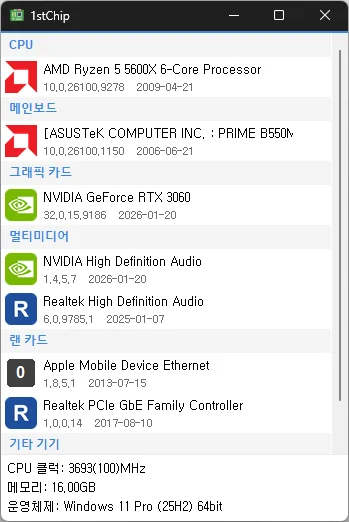
- View your CPU, motherboard, graphics card, multimedia, LAN card, and other devices on one screen
- Run it right away after extracting the files, with no installation required. Take it with you on a USB drive.
History
-
Versione 0.9.1 (2026/09/24)
- Corretta la mancata traduzione delle informazioni su frequenza della CPU, memoria e sistema operativo
- Risolto un problema per cui informazioni sulla data non valide potevano chiudere l'app
- Migliorata la stabilità durante il caricamento delle informazioni sul PC in alcuni sistemi
- Aggiunte le istruzioni mancanti per i dispositivi che presentano problemi
-
Versione 0.9.0 (2026/09/18)
- Prima versione
Related Links
- Update information: https://kilho.top/archives/notice/2940
Scarica il file
License
- 1stChip is open-source software.
- You can use it freely anywhere, including at work, at home, in government offices, and at school.
- You can distribute it freely anywhere.
Frequently Asked Questions (FAQ)
- Does it install drivers automatically?
No. It tells you whether your drivers are up to date and directs you to the download page.
You can install drivers yourself using files from the manufacturer. - Can I use it without an internet connection?
Yes. You can check your system specifications and installed drivers offline. An internet connection is only needed to check for newer drivers. - Does it show ads?
No. There are no ads. - Can I use it without installing it?
Yes. It is portable, so you can run it right after extracting the files. - Is it paid?
No. It is free (freeware).