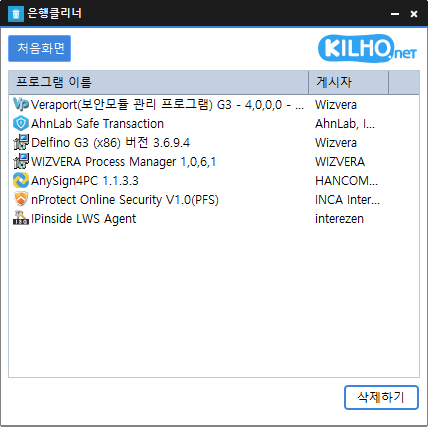
Bank Cleaner (0.9.1) has been updated.
- Easily remove security(?) programs that you have no choice but to install.
- Enjoy the convenience of using it without installation, all in a single file.
Prevziať súbor
Related Links
- Update information: https://kilho.top/archives/notice/2940
License
- Bank Cleaner is freeware.
- You can use it freely in any setting, including companies, homes, government offices, and schools.
- You may freely distribute it anywhere.
Frequently Asked Questions (FAQ)
- Is Bank Cleaner free?
Yes, Bank Cleaner is free to use at home, at companies, government offices, and schools. - Can it remove security programs from all banks?
We have confirmed that it can remove programs installed by major banks, including KB Kookmin Bank, IBK, Woori Bank, and NH Bank. - Is it safe to delete programs?
Bank Cleaner only launches the uninstallers provided by each security program. - Does it need to be installed?
No. You can run it as soon as you download it, without any installation.
Example Uses
- Cleanly remove unnecessary security programs left behind after online banking to improve your PC’s performance.
- Safely stop unnecessary bank-related programs from launching automatically and free up your computer’s resources.
- Clean up your PC regularly to keep it running smoothly even after online banking.
Tips
- Click or drag unwanted items in the program list to remove them all at once.
- Use Bank Cleaner regularly to clear out processes left behind after online banking and keep your system clean.
- Run it immediately after banking and remove unnecessary programs right away to help protect your privacy and security.