

There is a new post. Click here to view the latest post.
StartCleaner (1.0.9) has been updated.
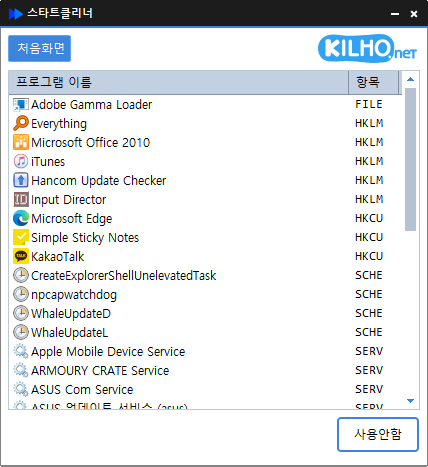
- Easily manage programs that run automatically at startup.
- Manage various items in one place, including the Startup folder, registry, Task Scheduler, and services.
- Safely change settings by disabling items instead of deleting them.
Website
- StartCleaner: https://startcleaner.kilho.net
History
-
เวอร์ชัน 1.0.9 (2026/03/27)
- แก้ไขปัญหาที่รายการโปรแกรมเริ่มต้นอาจแสดงไม่ถูกต้อง
- ปรับปรุงความเสถียรเมื่อเปลี่ยนการตั้งค่าโปรแกรมเริ่มต้น
- เพิ่มความน่าเชื่อถือขณะโหลดรายการโปรแกรมเริ่มต้น
- ปรับปรุงความเสถียรโดยรวมผ่านการล้างโค้ดภายใน
-
เวอร์ชัน 1.0.8 (2026/02/26)
- ปรับปรุงความเสถียรของการจัดการข้อมูลอัปเดต
-
เวอร์ชัน 1.0.7 (2026/01/29)
- ปรับปรุงความเสถียรเมื่อเกิดข้อผิดพลาดระหว่างบันทึกไฟล์
-
เวอร์ชัน 1.0.6 (2025/12/24)
- ปรับปรุงความเสถียรเมื่อโหลดรายการโปรแกรมเริ่มต้น
- แก้ไขปัญหาที่ตรวจไม่พบรายการโปรแกรมเริ่มต้นบางรายการอย่างถูกต้อง
- ปรับปรุงการประมวลผลภายในเพื่อลดข้อผิดพลาดที่อาจเกิดขึ้นขณะทำงาน
- เพิ่มความเสถียรและความน่าเชื่อถือโดยรวม
-
เวอร์ชัน 1.0.5 (2025/12/04)
- ปรับปรุงกระบวนการตั้งค่าเริ่มต้นขณะเริ่มโปรแกรม
Related Links
- Update notice: https://kilho.top/archives/notice/2940
License
- StartCleaner is freeware.
- You can use it freely in any setting, including offices, homes, government offices, and schools.
- You may distribute it freely anywhere.
Download file
Frequently Asked Questions (FAQ)
- Is StartCleaner free?
Yes, you can use StartCleaner for free at offices, homes, schools, government offices, and more. - Does it need to be installed?
No, you can run and use it right away without a separate installation process. - Can items only be disabled, not deleted?
Yes, you can safely manage settings by disabling programs instead of deleting them. - What items can it manage?
It manages all items that run automatically at startup, including the Startup folder, registry, Task Scheduler, and services.



잘 쓰고 있습니다.