ZipMania (0.9.9) has been updated.
更新
- 版本 0.9.9 (2026/09/21)
- 使用自有 GUI 引擎完全重构 ZipMania
- 移除 Tauri,使启动速度和界面响应速度提升约 9 倍
- 改善部分用户环境中的启动问题和界面延迟
- 简化启动流程,无需额外组件
- 改善文件列表和主要界面的易用性与稳定性
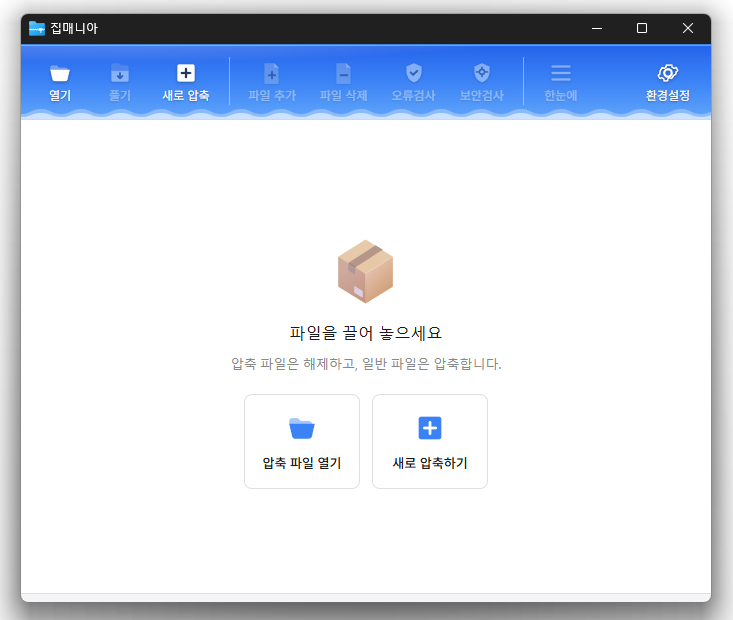
- Open a wide range of archive files, including ZIP, RAR, 7Z, EGG, ALZ, and ISO.
- Compress and extract files quickly with a dedicated ZIP engine.
Homepage
- ZipMania : https://zipmania.kilho.net
历史记录
-
版本 0.9.9 (2026/09/21)
- 使用自有 GUI 引擎完全重构 ZipMania
- 移除 Tauri,使启动速度和界面响应速度提升约 9 倍
- 改善部分用户环境中的启动问题和界面延迟
- 简化启动流程,无需额外组件
- 改善文件列表和主要界面的易用性与稳定性
-
版本 0.9.8 (2026/09/18)
- 增强命令行压缩和解压缩,提升与外部工具的集成能力
- 改善与常用 7-Zip 和 Bandizip 命令的兼容性
- 新增 zm.exe,使任务完成和结果检查更加可靠
- 新增命令行支持,可进行解压缩、文件列表查看、完整性测试等操作
- 新增压缩包验证,以及压缩后的源文件自动删除
- 支持直接向现有压缩包添加文件
- 支持批量解压到以各压缩包命名的独立文件夹
- 新增解压选中文件和不保留文件夹结构的选项
- 改善分卷压缩包的文件列表和解压缩支持
- 增强文件冲突处理,支持覆盖、跳过和重命名
- 实时显示进度、速度、剩余时间和当前文件
- 修复部分环境中的文件时间戳差异
- 改善打开文件以及压缩或解压缩时的稳定性
- 优化顶部界面设计,提升易用性
-
版本 0.9.6 (2026/09/16)
- 新增分卷压缩包,让大文件更易存储、分享和传输
- 只需选择第一个文件,即可打开并解压多卷压缩包
- 支持从 Total Commander、备份工具及其他外部应用静默压缩文件
- 改善文件安全性,防止任务取消或失败后留下不完整的压缩包
- 新增保护机制,防止旧分卷文件与新建压缩包混用
- 微调深色模式的颜色和外观
-
版本 0.9.5 (2026/09/10)
- 改善部分电脑上可能消失或显示异常的压缩包菜单
- 改善更新可靠性,使新功能更稳定地生效
- 让进度、失败项目和缺失文件一目了然
- 每次任务完成后,可快速打开结果文件夹
- 让常用文件夹和驱动器更易查找
- 调整进度和完成窗口,查看更加舒适
-
版本 0.9.4 (2026/09/06)
- 改善部分 Windows 11 管理员设置下右键压缩菜单的显示
- 增强错误处理,更快识别意外关闭
- 优化更新模块并改善稳定性
- 移除压缩界面中不必要的即将推出选项
Related Links
- Program source: https://github.com/newkilho/ZipMania
- Update information: https://kilho.top/archives/notice/2940
下载文件
License
- ZipMania is open-source software.
- You can use it freely at work, at home, in government offices, schools, and anywhere else.
- You are free to distribute it anywhere.
Frequently Asked Questions (FAQ)
- Which archive formats are supported?
You can open a wide range of archive files, including ZIP, RAR, 7Z, EGG, ALZ, and ISO. - Does it include ads or adware?
No, ZipMania has no ads or adware. No unnecessary programs are installed alongside it. - Is it open source?
Yes, ZipMania is distributed as open-source software. You can inspect the source code, and the software is developed transparently. - Can I view files without extracting them?
Yes, you can preview image and text files without extracting them. - Can I compress or extract files directly from File Explorer?
Yes, you can compress or extract files directly from the right-click menu in Windows File Explorer.