KTimer (2.0.0) has been updated.
Aggiorna
- Versione 2.0.0 (2026/09/23)
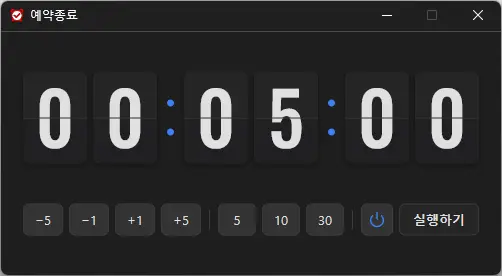
- Introdotto un elegante design di orologio a palette per controllare l’ora più rapidamente
- Aggiunti pulsanti intuitivi per impostare l’ora in modo più rapido e semplice
- Migliorata la selezione dello spegnimento e della sospensione con icone visive chiare
- Applicati numeri più definiti e colori ottimizzati per l’interfaccia scura
- Migliorati il comportamento del display e l’affidabilità in determinati ambienti utente
- Rinnovata l’intera app per un’esperienza più leggera e fluida
- A scheduled shutdown program for computers.
- Shuts down your computer at a specified time.
- Includes a screenshot feature so you can check what was happening just before shutdown.
- Can be used without installation.
Website
- KTimer: https://ktimer.kilho.net
History
-
Versione 2.0.0 (2026/09/23)
- Introdotto un elegante design di orologio a palette per controllare l’ora più rapidamente
- Aggiunti pulsanti intuitivi per impostare l’ora in modo più rapido e semplice
- Migliorata la selezione dello spegnimento e della sospensione con icone visive chiare
- Applicati numeri più definiti e colori ottimizzati per l’interfaccia scura
- Migliorati il comportamento del display e l’affidabilità in determinati ambienti utente
- Rinnovata l’intera app per un’esperienza più leggera e fluida
-
Versione 1.3.2 (2026/08/21)
- Migliorate le opzioni e il comportamento del menu in base al supporto dell'ibernazione
- Migliorato il passaggio alla modalità sospensione e aggiunta una notifica in caso di errore
- Risolto un problema di configurazione dell'avvio automatico che poteva verificarsi con alcuni software di sicurezza
- Migliorata la stabilità riorganizzando le impostazioni interne
- Migliorata la verifica degli aggiornamenti
-
Versione 1.3.1 (2024/11/16)
- Aggiunto il supporto per le lingue italiana, francese, russa e cinese
-
Versione 1.3.0 (2024/11/03)
- Modulo di notifica degli aggiornamenti migliorato.
- Corretto il modulo multilingue.
- Aggiunto il supporto per la modalità ibernazione.
- Aggiunta la possibilità di impedire esecuzioni duplicate.
-
Versione 1.2.0 (2023/08/17)
- Supporto multilingue
- Risolto il modulo di verifica degli aggiornamenti.
Related Links
- Update announcement: https://kilho.top/archives/notice/2940
License
- KTimer is freeware.
- You can use it freely in any setting, including companies, homes, government offices, and schools.
- You may distribute it freely anywhere.
Scarica il file
Frequently Asked Questions (FAQ)
- Is the automatic shutdown program free?
Yes, you can use this program for free anywhere, including companies, homes, government offices, and schools. - Does the program need to be installed?
No, you can run it right away without installing it. - Why is the screen captured before shutdown?
A screenshot is taken just before shutdown so you can easily check what was happening at the time when you next boot your computer. - Can I cancel a scheduled shutdown after setting it?
Yes, you can cancel or change the scheduled shutdown.
Examples of Use
- You can set your PC to shut down automatically when a download or backup is expected to finish.
- You can have your PC turn off automatically when you step away or before going to bed, saving power.
- After an automatic shutdown, you can refer to the screen showing what you were working on the previous day and resume work efficiently.
Helpful Tips
- Set a shutdown time in advance to reduce power consumption and extend your hardware’s lifespan.
- Use the screenshot automatically taken just before shutdown to quickly check important work and pick up where you left off after your next boot.
- If you often leave your PC running while away, scheduling a shutdown can help improve security.