KTimer (2.0.0) has been updated.
อัปเดต
- เวอร์ชัน 2.0.0 (2026/09/23)
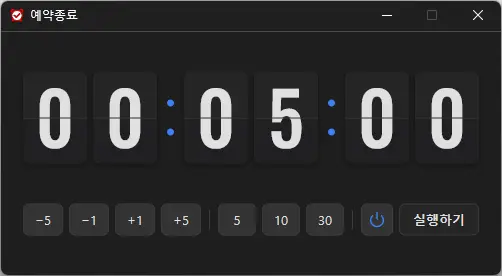
- เพิ่มดีไซน์นาฬิกาแบบพลิกที่ดูมีสไตล์เพื่อให้ตรวจสอบเวลาได้เร็วขึ้น
- เพิ่มปุ่มที่ใช้งานง่ายเพื่อให้ตั้งเวลาได้เร็วและสะดวกขึ้น
- ปรับปรุงการเลือกปิดเครื่องและโหมดสลีปด้วยไอคอนภาพที่ชัดเจน
- ปรับรูปแบบตัวเลขและสีให้คมชัดขึ้นและเหมาะกับอินเทอร์เฟซโหมดมืด
- ปรับปรุงการแสดงผลและความเสถียรในสภาพแวดล้อมของผู้ใช้บางรูปแบบ
- ปรับโฉมแอปทั้งหมดให้ใช้งานเบาและลื่นไหลยิ่งขึ้น
- A scheduled shutdown program for computers.
- Shuts down your computer at a specified time.
- Includes a screenshot feature so you can check what was happening just before shutdown.
- Can be used without installation.
Website
- KTimer: https://ktimer.kilho.net
History
-
เวอร์ชัน 2.0.0 (2026/09/23)
- เพิ่มดีไซน์นาฬิกาแบบพลิกที่ดูมีสไตล์เพื่อให้ตรวจสอบเวลาได้เร็วขึ้น
- เพิ่มปุ่มที่ใช้งานง่ายเพื่อให้ตั้งเวลาได้เร็วและสะดวกขึ้น
- ปรับปรุงการเลือกปิดเครื่องและโหมดสลีปด้วยไอคอนภาพที่ชัดเจน
- ปรับรูปแบบตัวเลขและสีให้คมชัดขึ้นและเหมาะกับอินเทอร์เฟซโหมดมืด
- ปรับปรุงการแสดงผลและความเสถียรในสภาพแวดล้อมของผู้ใช้บางรูปแบบ
- ปรับโฉมแอปทั้งหมดให้ใช้งานเบาและลื่นไหลยิ่งขึ้น
-
เวอร์ชัน 1.3.2 (2026/08/21)
- ปรับปรุงตัวเลือกเมนูและการทำงานตามการรองรับโหมดไฮเบอร์เนต
- ปรับปรุงการสลับโหมดสลีป และเพิ่มการแจ้งเตือนเมื่อการสลับไม่สำเร็จ
- แก้ไขปัญหาการตั้งค่าเริ่มต้นอัตโนมัติที่อาจเกิดขึ้นกับซอฟต์แวร์ความปลอดภัยบางประเภท
- ปรับปรุงเสถียรภาพด้วยการจัดระเบียบการตั้งค่าภายในใหม่
- ปรับปรุงการตรวจสอบการอัปเดต
-
เวอร์ชัน 1.3.1 (2024/11/16)
- เพิ่มการรองรับภาษาอิตาลี ฝรั่งเศส รัสเซีย และจีน
-
เวอร์ชัน 1.3.0 (2024/11/03)
- ปรับปรุงโมดูลแจ้งเตือนการอัปเดต.
- แก้ไขโมดูลหลายภาษา
- เพิ่มการรองรับโหมดไฮเบอร์เนต
- เพิ่มความสามารถในการป้องกันการเรียกใช้ซ้ำ
-
เวอร์ชัน 1.2.0 (2023/08/17)
- รองรับหลายภาษา
- แก้ไขโมดูลตรวจสอบการอัปเดต
Related Links
- Update announcement: https://kilho.top/archives/notice/2940
License
- KTimer is freeware.
- You can use it freely in any setting, including companies, homes, government offices, and schools.
- You may distribute it freely anywhere.
Download file
Frequently Asked Questions (FAQ)
- Is the automatic shutdown program free?
Yes, you can use this program for free anywhere, including companies, homes, government offices, and schools. - Does the program need to be installed?
No, you can run it right away without installing it. - Why is the screen captured before shutdown?
A screenshot is taken just before shutdown so you can easily check what was happening at the time when you next boot your computer. - Can I cancel a scheduled shutdown after setting it?
Yes, you can cancel or change the scheduled shutdown.
Examples of Use
- You can set your PC to shut down automatically when a download or backup is expected to finish.
- You can have your PC turn off automatically when you step away or before going to bed, saving power.
- After an automatic shutdown, you can refer to the screen showing what you were working on the previous day and resume work efficiently.
Helpful Tips
- Set a shutdown time in advance to reduce power consumption and extend your hardware’s lifespan.
- Use the screenshot automatically taken just before shutdown to quickly check important work and pick up where you left off after your next boot.
- If you often leave your PC running while away, scheduling a shutdown can help improve security.