
Update
- Added support for macOS
- Added drag-to-fit sizing for the area window
- Switched to full screen when no webpage capture tab is available
- Changed the capture area icon in the area window
- Video recording support (designation of whole screen and area)
- Whole screen, active program, window control, area application
- Support for PNG, JPG, BMP, GIF, MP4 file formats
- Support saving text with OCR functionality.
- Support floating image feature.
- Share the captured image on the web.
- Color extraction function
- Full web page capture
- Printer output
Website
- Kalmuri : https://kalmuri.kilho.net
History
-
Version 5.0.1 (2026/10/15)
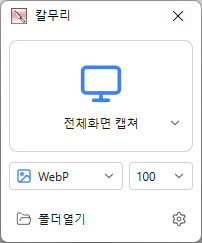
- Changed the main screen to show capture areas and save formats with icons
- Added ripple/highlight effects to show mouse click locations in recordings
- Added capture area/save format selectors and capture/recording buttons to the region window
- Added animated GIF/WebP recording and frame rate settings
- Added graphics card based screen capture and recording
- Added NVIDIA/Intel/AMD graphics card support for MP4 recording
- Refined alignment of video and audio at the start of recording
- Added region window color selection in settings
- Added a stop recording button to the main screen
-
Version 4.3.1 (2026/09/28)
- Enhanced image upload security and failure handling
- Fixed WebP save errors and empty file creation
- Fixed recording startup and status issues in some environments
- Improved screen capture and drag capture stability
- Prevented existing files from being overwritten during rapid consecutive captures
- Prevented OCR and configuration errors
- Improved duplicate application launch prevention
- Improved capture area size and position saving
- Enhanced overall application stability
-
Version 4.3.0 (2026/08/28)
- Rebuilt web page capture from the ground up
- Improved capture speed and reliability with the latest Edge and Chrome browsers
- Added capture of entire long web pages in a single image
- Added automatic detection of installed browsers with no extra setup
- Improved detection of the current page even with multiple windows and tabs open
- Improved capture recovery after browser closure or delayed responses
- Added clear guidance when web capture is unavailable
- Removed the outdated capture method for better compatibility with modern websites
-
Version 4.2.7 (2026/08/14)
- Fixed webpage capture failures and subsequent capture issues in some environments
- Fixed save folder selection issues in certain situations
License
- Kalmuri is freeware.
- You can use it freely anywhere, including at work, home, government offices, and schools.
- You may freely distribute it anywhere.
Download
 Download
(Windows)
 Download
(macOS)
Frequently Asked Questions (FAQ)
- Is Kalmuri free?
Yes, Kalmuri is free to use anywhere, including at work, home, school, and government offices. - What image formats are supported for saving captures?
PNG, JPG, WebP, BMP, and GIF formats are supported. - Can I record videos too?
Yes, you can record the entire screen or a selected area as a video. - Can I extract text from captured images?
Yes, you can extract text from images using optical character recognition (OCR). - Do I need to install the program?
No, Kalmuri is available as a standalone file and can be used without installation.
Related Links
- Update Notice : https://kilho.top/archives/notice/2940