新しい記事があります。 こちらをクリックして最新の記事を確認してください。
KTimer (1.3.2) has been updated.
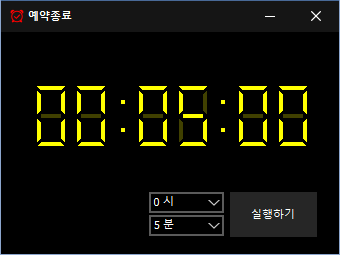
- A scheduled computer shutdown program.
- Shuts down your computer at a specified time.
- Includes a screenshot feature so you can check what was happening just before shutdown.
- Usable without installation.
Website
- KTimer: https://ktimer.kilho.net
更新履歴
-
バージョン 1.3.2 (2026/08/21)
- 休止状態のサポートに応じたメニュー項目と動作を改善
- スリープモードの切り替えを改善し、切り替えに失敗した場合の通知を追加
- 特定のセキュリティソフトで発生することがある自動起動設定の問題を修正
- 内部設定を整理して安定性を改善
- 更新の確認を改善
-
バージョン 1.3.1 (2024/11/16)
- イタリア語、フランス語、ロシア語、中国語に対応しました
-
バージョン 1.3.0 (2024/11/03)
- 更新通知モジュールを改善しました。
- 多言語モジュールを修正しました。
- 休止状態に対応しました。
- 二重実行を防止する機能を追加しました。
-
バージョン 1.2.0 (2023/08/17)
- 多言語に対応
- 更新チェックモジュールを修正
-
バージョン 1.0.0 (2022/09/07)
- 初回リリース
Related Links
- Update notice: https://kilho.top/archives/notice/2940
License
- KTimer is freeware.
- You can use it freely in any setting, including offices, homes, government offices, and schools.
- You are free to distribute it anywhere.
ファイルをダウンロード
Frequently Asked Questions (FAQ)
- Is this automatic shutdown program free?
Yes, you can use this program for free anywhere, including offices, homes, government offices, and schools. - Does the program need to be installed?
No, you can run it right away without installing it. - Why is the screen captured before shutdown?
A screenshot of the screen just before shutdown is taken so you can easily check what was happening when the computer shut down the next time you boot it. - Can I cancel a scheduled shutdown after setting it?
Yes, you can cancel or change a scheduled shutdown.
Examples of Use
- You can estimate when a download or backup will finish and have your PC shut down automatically.
- You can have your PC shut down automatically when stepping away or before bed, saving power.
- After an automatic shutdown, you can refer to the work screen from the time of shutdown the next day and resume your work efficiently.
Tips
- Set a shutdown time in advance to reduce power consumption and extend your hardware’s lifespan.
- For important tasks, use the screenshot captured automatically just before shutdown to quickly check what you were doing and pick up where you left off at the next boot.
- In places where you often leave your PC running unattended, scheduling a shutdown can help improve security.