有新文章。 点击 这里 查看最新文章。
KTimer (1.3.2) has been updated.
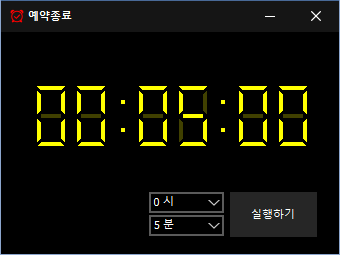
- A scheduled computer shutdown program.
- Shuts down your computer at a specified time.
- Includes a screenshot feature so you can check what was happening just before shutdown.
- Usable without installation.
Website
- KTimer: https://ktimer.kilho.net
历史记录
-
版本 1.3.2 (2026/08/21)
- 根据休眠支持情况优化菜单选项和行为
- 优化睡眠模式切换,并在切换失败时添加通知
- 修复某些安全软件可能导致的自动启动设置问题
- 重新整理内部设置,提升稳定性
- 优化更新检查
-
版本 1.3.1 (2024/11/16)
- 新增意大利语、法语、俄语和中文支持
-
版本 1.3.0 (2024/11/03)
- 改进更新通知模块。
- 修复多语言模块
- 新增对休眠模式的支持
- 新增防止重复执行的功能
-
版本 1.2.0 (2023/08/17)
- 多语言支持
- 修复更新检查模块
-
版本 1.0.0 (2022/09/07)
- 首次发布
Related Links
- Update notice: https://kilho.top/archives/notice/2940
License
- KTimer is freeware.
- You can use it freely in any setting, including offices, homes, government offices, and schools.
- You are free to distribute it anywhere.
下载文件
Frequently Asked Questions (FAQ)
- Is this automatic shutdown program free?
Yes, you can use this program for free anywhere, including offices, homes, government offices, and schools. - Does the program need to be installed?
No, you can run it right away without installing it. - Why is the screen captured before shutdown?
A screenshot of the screen just before shutdown is taken so you can easily check what was happening when the computer shut down the next time you boot it. - Can I cancel a scheduled shutdown after setting it?
Yes, you can cancel or change a scheduled shutdown.
Examples of Use
- You can estimate when a download or backup will finish and have your PC shut down automatically.
- You can have your PC shut down automatically when stepping away or before bed, saving power.
- After an automatic shutdown, you can refer to the work screen from the time of shutdown the next day and resume your work efficiently.
Tips
- Set a shutdown time in advance to reduce power consumption and extend your hardware’s lifespan.
- For important tasks, use the screenshot captured automatically just before shutdown to quickly check what you were doing and pick up where you left off at the next boot.
- In places where you often leave your PC running unattended, scheduling a shutdown can help improve security.