
How much of your AI limit is left?
Claude and Codex have 5-hour and weekly limits. You may have been in the middle of a task when you hit a limit and had to stop, or opened the usage page separately to check how much you had used.
Aseul displays small circular gauges next to the clock on your taskbar. A quick glance tells you how close you are to your limit.
Taskbar usage gauges
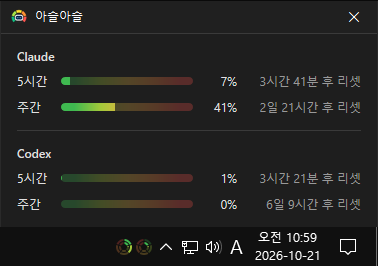
There’s one circle for each service. The outer ring shows weekly usage, and the inner ring shows 5-hour usage. Claude is on the left and Codex is on the right.
The rings fill clockwise from the 12 o’clock position to show how much you’ve used, changing through five color zones: green, light green, yellow, orange, and red. The closer the color gets to red, the less of your limit is left. Hover over a gauge to see the numbers right away, like Claude: 5% / 50%.
Time until reset
Click a gauge to open the status window. Next to the 5-hour and weekly usage bars for each service, you’ll see how long until the limit resets, such as Resets in 2 days 21 hours.
Even when you close the window, the gauges stay on the taskbar and periodically check and update your usage.
7-day usage history
Hover over a service in the status window to see a chart for the past 7 days. Each day is shown as a bar, displaying that day’s weekly usage and how much you used that day, so you can see at a glance which days you used the most this week.
Useful for
- Checking how much usage you have left before starting a long task
- Finding out when you can use the service again after hitting a limit
- Planning how to spread your usage across the week
Whether you use Claude or Codex, Aseul shows only the services you use—no setup required. Both an installer and a portable version that just needs to be unzipped are available.
Website
- Aseul: https://kilho.net/aseul
Download
 Download
(Windows)
License
- Aseul is freeware.
- You can use it freely anywhere, including at work, at home, in government offices, and at school.
- You may freely distribute it anywhere.
Frequently Asked Questions (FAQ)
- Is it free?
Yes. Aseul is freeware and can be used for free at work, at home, or at school. - Does it show ads?
No. You can use it without ads. - Can I use it without installing it?
Yes. Download the portable version, unzip it, and run Aseul.exe. - Do I need to log in separately?
No. If you’re logged in to Claude Code or Codex, Aseul reads your usage through that login. Codex usage is shown when you’re logged in with a ChatGPT account. - Can I use it with just Claude or just Codex?
Yes. Only services you’re logged in to are shown in the gauges and status window. - Does it start automatically when I turn on my computer?
Yes. Turn this on or off from the Run at startup option in the gauge’s right-click menu. It’s enabled when you install the installer version.
Related Links
- Update notices: https://kilho.top/archives/notice/2940