Still doing all that tedious web work yourself?
Collecting prices from multiple online stores in a spreadsheet, filling out the same form over and over, posting to a blog, or finding a specific email in your inbox. The web is full of tasks that keep your hands busy but don’t need much thought.
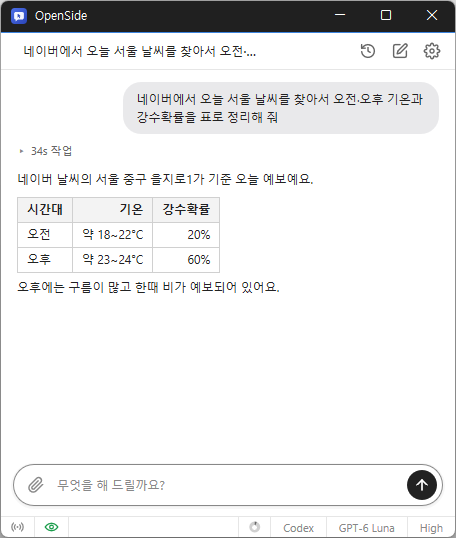
OpenSide lets you hand off those tasks with a single chat message. Tell it what you want to do, and AI opens websites, reads pages, clicks buttons, enters text, and handles the task from start to finish, then gives you a brief summary.
To use AI, sign in with your existing ChatGPT account or enter an API key for Claude, OpenAI, or Gemini.
Hand off web tasks through chat
Just enter a task in the What can I do for you? field and press Enter. You can see progress one line at a time, and even give it additional instructions along the way, such as “Show prices in won,” to change its course.
If you say “Compare them” or “Just write a draft,” it won’t take irreversible actions such as sending, paying, deleting, or posting. If you ask it to complete a task, for example by saying “Send it,” it will click the final button, too.
Use your own browser and existing logins
It works in the Chrome or Edge browser you’re already using, not in a new browser. You won’t need to log in again to sites where you’re already signed in.
AI only operates in the tab where it’s working, so you can keep using other tabs in the meantime. It handles frequently used sites such as Naver Blog, Tistory, Gmail, Google Docs and Sheets, Notion, Slack, and YouTube faster and more accurately with methods tailored to each site.
Get data in Excel and work remotely with Telegram
Download collected data as an Excel (.xlsx) file. Values that start with 0, such as phone numbers, are preserved as they are. If you prefer, it can also create a CSV file that displays Korean text correctly.
Connect Telegram to assign tasks from your phone while you’re out and receive the results and files. There’s no need to create a bot yourself.
Great for tasks like these
- Putting prices from multiple online stores or real estate listings into a table
- Submitting the same application form multiple times using a list
- Posting a finished piece to your blog, or finding and summarizing emails and documents
Choose between the installer and portable versions. Just sign in with your AI account to get started.
Website
- OpenSide : https://kilho.net/openside
Download
License
- OpenSide is freeware.
- You may use it freely at work, at home, in government offices, at school, and anywhere else.
- You may distribute it freely anywhere.
Frequently Asked Questions (FAQ)
- Is it free?
Yes. OpenSide is freeware.
AI usage costs depend on the plan for the AI account or API key you use. - Does it show ads?
No. There are no ads. - Can I use it without installing it?
Yes. Extract the portable version (ZIP) and run OpenSide.exe. - Can I use other AI services besides ChatGPT?
Yes. Register API keys for Claude, OpenAI, or Gemini, then switch between them right from the chat screen. - Can I use my browser while AI is working?
Yes. AI only operates in the tab where it’s working, so you can keep doing what you were doing in other tabs.
Related Links
- Update information : https://kilho.top/archives/notice/2940