StayOn (2.0.0) has been updated.
Aggiorna
- Versione 2.0.0 (2026/09/21)
- Completamente rinnovato per un'esperienza più leggera e affidabile
- Migliorata la prevenzione del timeout dello schermo, della sospensione e dello stato Inattivo imprevisto in app come Teams
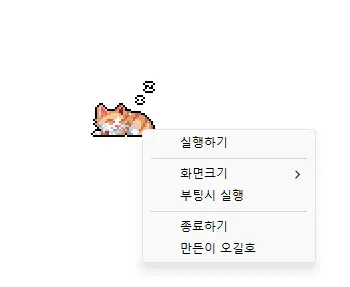
- Aggiunte le opzioni di dimensione dello schermo 100%, 200% e 400%
- Salvataggio automatico della posizione della finestra e della dimensione dello schermo, con una migliore disposizione su più monitor
- Prevents your computer from going to sleep or turning off the screen while you work.
- You can use it without changing the Windows power and sleep settings.
- It does not change Windows settings.
- No installation is required.
History
-
Versione 2.0.0 (2026/09/21)
- Completamente rinnovato per un'esperienza più leggera e affidabile
- Migliorata la prevenzione del timeout dello schermo, della sospensione e dello stato Inattivo imprevisto in app come Teams
- Aggiunte le opzioni di dimensione dello schermo 100%, 200% e 400%
- Salvataggio automatico della posizione della finestra e della dimensione dello schermo, con una migliore disposizione su più monitor
-
Versione 1.0.2 (2024/11/25)
- Rimossi completamente gli stili Delphi VCL.
- Risolti gli errori Direct2D che si verificavano in specifici ambienti del computer
- Ottimizzazione HiDPI migliorata.
-
Versione 1.0.1 (2024/11/16)
- Aggiunto il supporto per italiano, francese e russo
- Libreria DzHTMLText aggiornata
-
Versione 1.0.0 (2024/11/03)
- Modulo di notifica degli aggiornamenti migliorato.
- Supporto multilingue
-
Versione 0.9.0 (2024/01/10)
- Prima versione
Related Links
- About the program: https://v2.kilho.net/stayon
- Update information: https://kilho.top/archives/notice/2940
Scarica il file
License
- StayOn is freeware.
- You can use it freely anywhere, including at work, at home, in government offices, and at school.
- You may freely distribute it anywhere.
Frequently Asked Questions (FAQ)
- What does this program do?
It prevents your computer from going to sleep or turning off the screen because a screensaver starts while you work. - Do I need to change the Windows power settings myself?
No. You don’t need to adjust the Windows power and sleep settings. Sleep mode and screen shutoff are disabled only while StayOn is running. - Does it change Windows settings?
No. It does not change Windows settings. When you close StayOn, your computer returns to its original power settings. - Does it need to be installed?
No. You can run the downloaded file directly without installing it. - Does it include ads or adware?
No. StayOn contains no ads or adware, and it does not install any unwanted programs. - Can I use it for free?
Yes. StayOn is freeware and can be used for free anywhere, including at work, at home, in government offices, and at school.