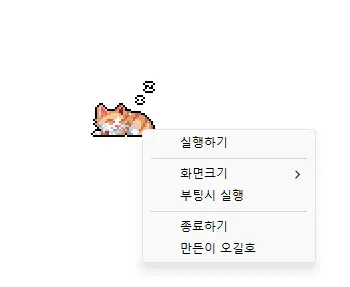
StayOn (2.0.0) has been updated.
Cập nhật
- Phiên bản 2.0.0 (2026/09/21)
- Làm mới hoàn toàn để mang lại trải nghiệm nhẹ hơn và đáng tin cậy hơn
- Cải thiện khả năng ngăn màn hình hết thời gian chờ, chuyển sang chế độ ngủ và chuyển sang trạng thái Vắng mặt ngoài ý muốn trong các ứng dụng như Teams
- Đã thêm các tùy chọn kích thước hiển thị 100%, 200% và 400%
- Tự động lưu vị trí cửa sổ và kích thước hiển thị, đồng thời cải thiện việc bố trí trên nhiều màn hình
- Prevents your computer from going to sleep or turning off the screen while you work.
- You can use it without changing the Windows power and sleep settings.
- It does not change Windows settings.
- No installation is required.
History
-
Phiên bản 2.0.0 (2026/09/21)
- Làm mới hoàn toàn để mang lại trải nghiệm nhẹ hơn và đáng tin cậy hơn
- Cải thiện khả năng ngăn màn hình hết thời gian chờ, chuyển sang chế độ ngủ và chuyển sang trạng thái Vắng mặt ngoài ý muốn trong các ứng dụng như Teams
- Đã thêm các tùy chọn kích thước hiển thị 100%, 200% và 400%
- Tự động lưu vị trí cửa sổ và kích thước hiển thị, đồng thời cải thiện việc bố trí trên nhiều màn hình
-
Phiên bản 1.0.2 (2024/11/25)
- Đã loại bỏ hoàn toàn Delphi VCL Styles.
- Đã khắc phục lỗi Direct2D xảy ra trong một số môi trường máy tính cụ thể
- Đã cải thiện tối ưu hóa HiDPI.
-
Phiên bản 1.0.1 (2024/11/16)
- Đã thêm hỗ trợ tiếng Ý, tiếng Pháp và tiếng Nga
- Đã cập nhật thư viện DzHTMLText
-
Phiên bản 1.0.0 (2024/11/03)
- Đã cải thiện mô-đun thông báo cập nhật.
- Hỗ trợ đa ngôn ngữ
-
Phiên bản 0.9.0 (2024/01/10)
- Bản phát hành đầu tiên
Related Links
- About the program: https://v2.kilho.net/stayon
- Update information: https://kilho.top/archives/notice/2940
Tải về tệp tin
License
- StayOn is freeware.
- You can use it freely anywhere, including at work, at home, in government offices, and at school.
- You may freely distribute it anywhere.
Frequently Asked Questions (FAQ)
- What does this program do?
It prevents your computer from going to sleep or turning off the screen because a screensaver starts while you work. - Do I need to change the Windows power settings myself?
No. You don’t need to adjust the Windows power and sleep settings. Sleep mode and screen shutoff are disabled only while StayOn is running. - Does it change Windows settings?
No. It does not change Windows settings. When you close StayOn, your computer returns to its original power settings. - Does it need to be installed?
No. You can run the downloaded file directly without installing it. - Does it include ads or adware?
No. StayOn contains no ads or adware, and it does not install any unwanted programs. - Can I use it for free?
Yes. StayOn is freeware and can be used for free anywhere, including at work, at home, in government offices, and at school.