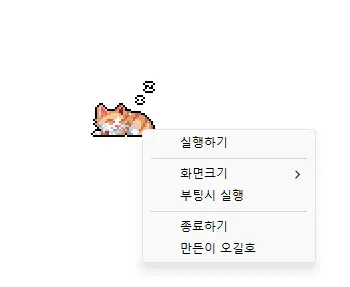
StayOn (2.0.0) has been updated.
Uppdatera
- Version 2.0.0 (2026/09/21)
- Helt uppdaterad för en smidigare och mer tillförlitlig upplevelse
- Förbättrad förhindring av skärmtimeout, viloläge och oväntad statusen Inte vid datorn i appar som Teams
- Alternativ för visningsstorleken 100 %, 200 % och 400 % har lagts till
- Automatisk sparning av fönsterposition och visningsstorlek samt förbättrad placering på flera bildskärmar
- Prevents your computer from going to sleep or turning off the screen while you work.
- You can use it without changing the Windows power and sleep settings.
- It does not change Windows settings.
- No installation is required.
History
-
Version 2.0.0 (2026/09/21)
- Helt uppdaterad för en smidigare och mer tillförlitlig upplevelse
- Förbättrad förhindring av skärmtimeout, viloläge och oväntad statusen Inte vid datorn i appar som Teams
- Alternativ för visningsstorleken 100 %, 200 % och 400 % har lagts till
- Automatisk sparning av fönsterposition och visningsstorlek samt förbättrad placering på flera bildskärmar
-
Version 1.0.2 (2024/11/25)
- Delphi VCL Styles har tagits bort helt.
- Direct2D-fel som uppstod i specifika datormiljöer har åtgärdats
- Förbättrad HiDPI-optimering.
-
Version 1.0.1 (2024/11/16)
- Stöd för italienska, franska och ryska har lagts till
- Biblioteket DzHTMLText har uppdaterats
-
Version 1.0.0 (2024/11/03)
- Modulen för uppdateringsaviseringar har förbättrats.
- Stöd för flera språk
-
Version 0.9.0 (2024/01/10)
- Första versionen
Related Links
- About the program: https://v2.kilho.net/stayon
- Update information: https://kilho.top/archives/notice/2940
Ladda ner fil
License
- StayOn is freeware.
- You can use it freely anywhere, including at work, at home, in government offices, and at school.
- You may freely distribute it anywhere.
Frequently Asked Questions (FAQ)
- What does this program do?
It prevents your computer from going to sleep or turning off the screen because a screensaver starts while you work. - Do I need to change the Windows power settings myself?
No. You don’t need to adjust the Windows power and sleep settings. Sleep mode and screen shutoff are disabled only while StayOn is running. - Does it change Windows settings?
No. It does not change Windows settings. When you close StayOn, your computer returns to its original power settings. - Does it need to be installed?
No. You can run the downloaded file directly without installing it. - Does it include ads or adware?
No. StayOn contains no ads or adware, and it does not install any unwanted programs. - Can I use it for free?
Yes. StayOn is freeware and can be used for free anywhere, including at work, at home, in government offices, and at school.