
Where Did I Save That File?
Sometimes you know you downloaded a file, but can’t remember which folder you put it in. Opening folders one by one or waiting for File Explorer to finish searching can take ages.
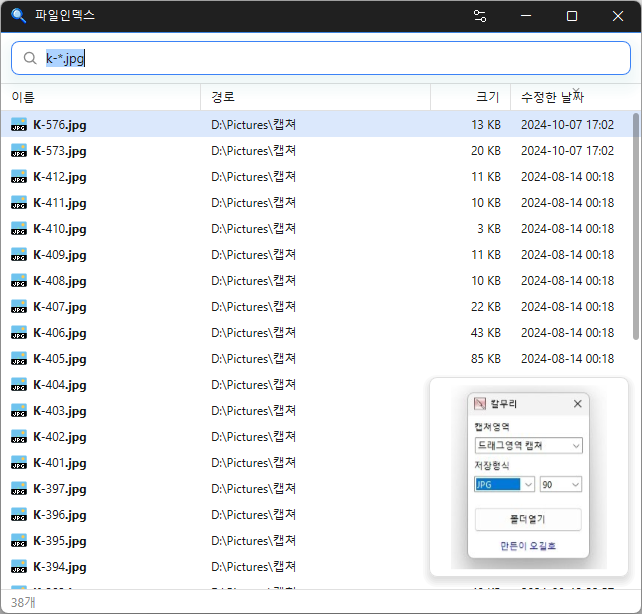
FileIndex finds files across every drive on your PC, even if you type only part of a name. Results update as you type, so just open the file as soon as you see it.
Find Files As You Type
When you first run it, FileIndex creates a list of files on your drives. After that, it tracks files being added, deleted, or renamed in real time. Newly downloaded files are searchable right away, and the default sort order is by most recently modified, so recent files appear at the top.
Open found files with a double-click, just like in File Explorer, or copy, drag and drop, and use the right-click menu. Select a photo, video, or PDF to see a thumbnail preview.
Korean Initial-Consonant Search and Search Criteria
For Korean filenames, you can search using just the initial consonants. Type only ㄱㅇㅅ, for example, and “계약서” will appear. Separate multiple words with spaces to find names that contain all of them.
You can combine criteria for extensions (ext:pdf), file size (size:>1gb), wildcards (*.txt), and regular expressions (regex:), so a search like “videos over 500 MB” takes just one line.
Find Duplicate Files
It groups together files with the same name, the same size, or even identical contents. Combine it with other criteria, such as dupe:content ext:jpg, to find and clean up duplicate photos or videos.
Useful For
- Finding a file when you can’t remember where you saved it
- Cleaning up large and duplicate files when your disk is full
- Finding files on USB drives or external disks all at once
When you close the window, FileIndex stays in the system tray, ready to open again at any time. Both an installer and a portable version are available.
Website
- FileIndex : https://kilho.net/fileindex
Download
License
- FileIndex is freeware.
- You can use it freely at work, at home, in government offices, at school, and anywhere else.
- You may distribute it freely anywhere.
Frequently Asked Questions (FAQ)
- Is it free?
Yes. FileIndex is freeware and can be used for free at work, at home, or at school. - Does it show ads?
No. You can use it without ads. - Can I use it without installing it?
Yes. Download the portable version, extract it, and run FileIndex.exe. Both versions have the same features. - Can I search using Korean initial consonants?
Yes. Enter just the consonants, such as ㄱㅇㅅ, to find names whose initials match in order, such as “계약서”. - Can I search for newly created files right away?
Yes. New files, deleted files, and renamed files are reflected in the search results right away. - Can it find files on USB drives?
Yes. Plug one in and FileIndex will index it automatically within seconds and include its files in the results.
Related Links
- Update notices : https://kilho.top/archives/notice/2940